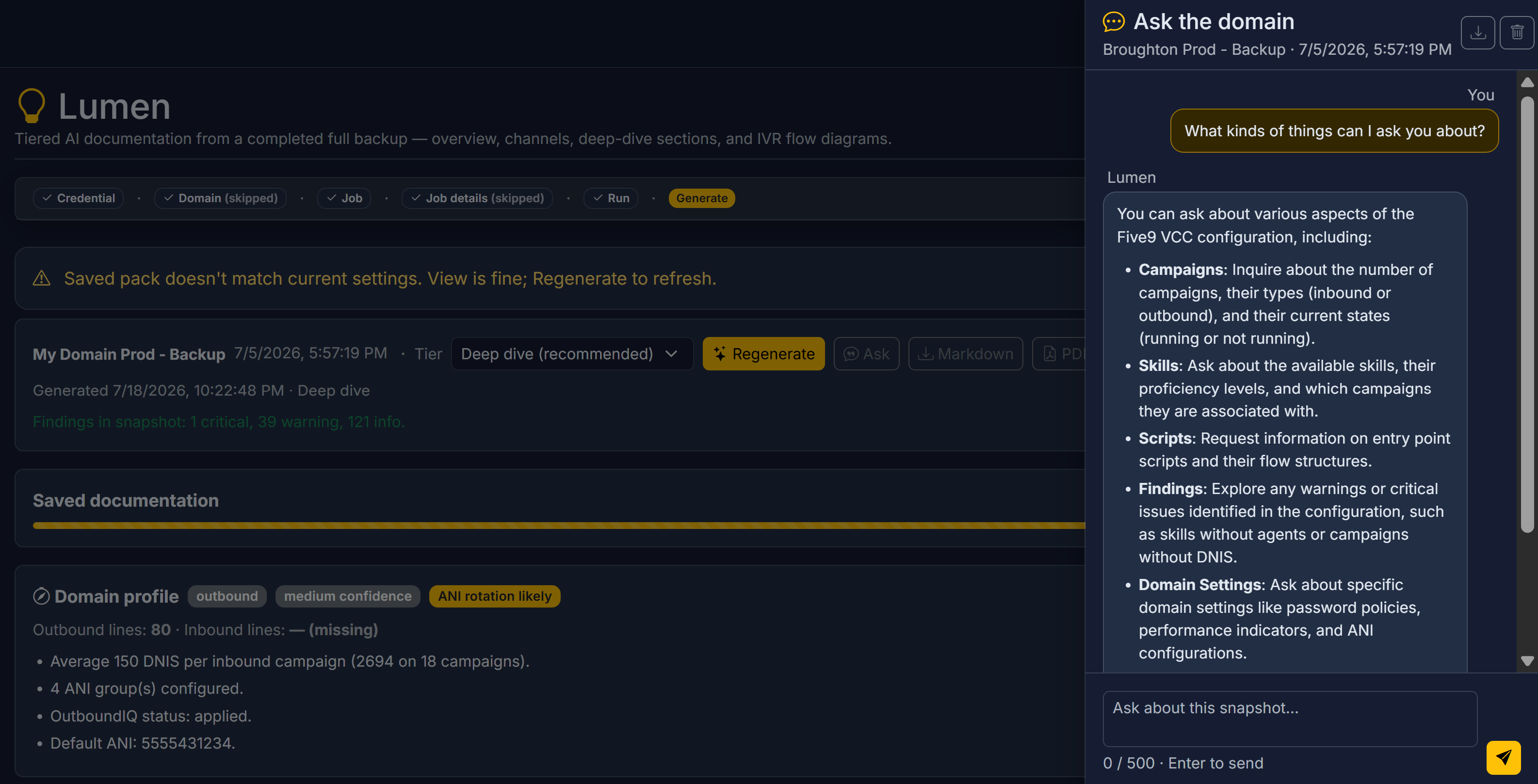
Why Five9 domains need documentation that stays current
Every mature Five9 estate has the same documentation problem: the Visio is two years stale, the wiki was last updated by someone who left, and the only person who can explain the IVR is on PTO. When auditors, new hires, or a CAB ask “how does this contact center actually work?”, the answer is usually a scramble through screenshots and tribal knowledge.
Lumen closes that gap from the source of truth you already protect. It reads a completed full backup in 9Vault and produces documentation you can hand to a stakeholder — executive overview, channel narratives, deep-dive script walkthroughs, and IVR flow diagrams — without asking an engineer to write it from scratch after every release.
How Lumen works from a backup
-
Start from a completed full backup
Open Lumen from the Operations sidebar, from a job’s Run History (stars icon), or from the dashboard card for a credential’s latest full snapshot. Partial backups are not supported — documentation needs a complete picture. -
Add optional business context
Frame the narrative with domain defaults (or a narrower job overlay for an MSP slice). Skip is remembered per credential or job when you don’t need it. Context chips stay editable on Generate without losing your run selection. -
Preflight, pick a tier, generate
Lumen checks which documentation tiers fit the snapshot. Oversized tiers lock so you choose a lower tier or a smaller domain cut. Generate produces Markdown and PDF downloads; diagrams render live in the page accordion, with Mermaid source in the PDF for Lucidchart / draw.io workflows.
IVR flow diagrams are built from script structure in the backup — exact fidelity to the config. The narrative prose is AI. That split matters when you need both a diagram that matches production and an explanation a non-admin can read.
Documentation tiers
Pick the depth your audience needs. Your plan caps the maximum tier; preflight locks anything too large for the selected snapshot.
| Tier | Scope | Mermaid |
|---|---|---|
| 1 — Overview | Stakeholder briefing: scale, channel mix, campaigns/skills highlights, ops notes; short hygiene close (Trace owns full findings) | No |
| 2 — Channels | Campaigns, skills, entry-point IVRs, findings | Yes — entry-point IVRs |
| 3 — Deep dive | Tier 2 plus users, profiles, and scripts (capped on very large domains) | Yes |
- Script focus — at Tier 2+, rank which IVR scripts get diagrams and deep dives under the script cap. Entry IVRs prioritize by campaign use; leftover slots favor shared modules on hot paths. Helper
fs-*scripts are soft-demoted by default; any script can still be diagrammed on demand from its detail page. - Interactive flow links — Tier 2+ entry IVRs (and Tier 3 script sections) get expirable guest URLs for live Mermaid diagrams. PDFs carry narrative plus links. Retention follows plan (30 / 60 / 90 days).
- Domain profile signals — orientation, line capacity, ANI-rotation cues, and OutboundIQ partner status pulled from the same snapshot.
Ask, Change Insights & CAB briefs
Documentation is the pack you download. Lumen also answers questions in the moment — always grounded in configuration context, never inventing live call stats or executing restores.
- Lumen Ask — chat about your configuration or 9Vault itself. On Generate, Ask opens a thread grounded in that snapshot’s Tier 2 summary. On a Five9 object detail page, Ask uses the live object; with a full backup available, Ask with domain snapshot pulls domain-wide dependencies. Context-aware Ask also grounds on dashboard, credential detail (including last connection-test results), jobs, Trace findings, Change Wizard preflight, profiles, and Diff Check after a backup↔backup compare.
- Change Insights — from Diff Check, Summarize changes opens Ask with a review summary: compare setup, scale, themes, IVR notes, and a checklist. Follow-ups stay in that thread. Live compare stays in Diff View for field-level detail.
- CAB brief — on a Relay promotions package, generate a one-page approver narrative: frozen scope, stage readiness, IVRs touched, and Trace findings on the source snapshot. Deterministic proof stays under Export evidence — Lumen writes the story; the package keeps the receipts.
That’s proof of work in plain English: attach the PDF, share a flow link, or drop a CAB brief into the approval packet instead of writing the narrative by hand after every change.
What Lumen gives you
Tiered AI domain docs
Overview, Channels, or Deep dive from a full backup — Markdown and branded PDF downloads when generation completes.
IVR flows as Mermaid
Diagrams from real script structure, with guest share links and Mermaid source for Lucidchart or draw.io.
Lumen Ask
Context-aware Q&A grounded in the snapshot, the live object, or the page you’re on — rate-limited per tenant.
Change Insights
Auto-summarize a backup↔backup Diff Check into a review narrative with setup context and an actionable checklist.
CAB briefs for approvers
One-page promotion summaries for people who need the story without reading raw config — alongside exportable evidence.
Single-script Explain
Plain-English IVR routing for a script when you need the path explained without generating a full domain pack.
Lumen rides the same snapshots as 9Vault backup, the same diffs as Spark, and the same promotion packages as Relay. Hygiene totals in the docs align with Trace for the same snapshot — documentation and discovery stay consistent.
Who it’s for
Leaders who need a brief, not a config dump
When the question is “how does our contact center work?”, Overview and Channels tiers give you a stakeholder-ready answer tied to a dated backup — not a slide deck that aged out last quarter.
Delivery teams and change control
Generate Change Insights after a Diff Check, attach a CAB brief to a PROD request, and share IVR flow links with reviewers who should never have to open Admin. The narrative is the proof of work; the package evidence stays deterministic.
MSPs and multi-domain teams
Job-level business context lets you document an MSP slice without rewriting the whole domain story. Client-ready PDFs and share links travel with the engagement — the same backup posture, explained in language the customer can read.
FAQ
Is this a Five9 product?
No — 9Vault is an independent product from 9Vault, LLC, built for teams that run Five9. Lumen documents and explains the domains you already operate; it does not replace your Five9 relationship.
Does Lumen invent how my IVR works?
Flow diagrams are built from script structure in the backup snapshot — they match the config. Narrative prose is AI and meant for human readers. Always treat diagrams as the structural source of truth when the two feel different.
Can I document a partial backup?
No. Lumen requires a completed full backup so the documentation isn’t missing half the estate. Partial runs stay out of scope by design.
What about live call stats or making changes from Ask?
Out of scope. Lumen is for understanding configuration — documentation, explanation, Diff Check summaries, and CAB narratives. Live call stats, restore execute, and delete actions are not available through Ask.
How do I share a flow with someone outside 9Vault?
Tier 2+ interactive flow links are expirable guest URLs for live Mermaid diagrams. PDFs include the narrative and those links (not embedded diagram source). Retention depends on plan: 30, 60, or 90 days.
Stop rewriting the domain story after every release
Tell us about your documentation pain — handoffs, audits, CAB packs — and we’ll show Lumen on a real backup.
Contact 9Vault